How to root your android device in Secure and Easy Way,If you are android user you probably hear about rooting. Initially when you purchase your phone from market it is not rooted and some times when you install any software it asking root permission. Root permission means simply full access of your device without limitation .
So After rooting your device, you have full access to the entire system and can run special types of apps that require root permissions. These apps can disable bloatware, control app permissions, enable tethering, and do lots of other cool things.
How to use vRoot to root any Android Device:
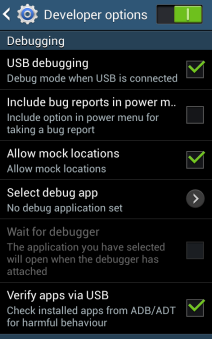
Step 1: Enable USB Debugging on your Android Smartphone.
To enable USB debugging, Open Settings > Developers Option > USB Debugging > Tick to Enable.
(Developers Option is hidden for Android 4.2.2 or above, to unhide Go to
Settings > About Phone > Built Number (Tap on it for 5-8 times).
Step 2:
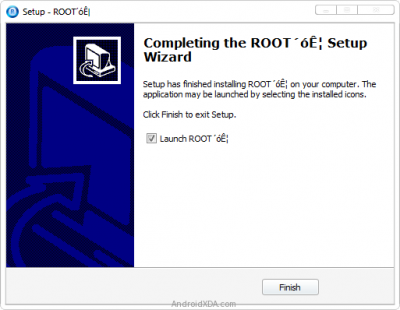
Download and install vRoot Application on your Windows Computer.
Step 3: Once vRoot Application is installed on your Computer,
Open It.
Step 4: Once vRoot Application is launched,
connect your Android device to the computer.
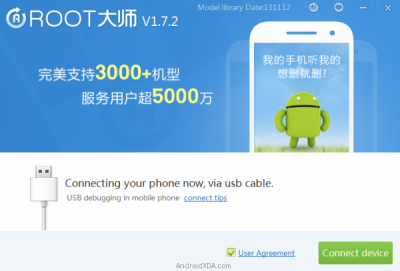
Step 5: Once Your Smartphone is connected successfully to the computer, vRoot will automatically detect your Smartphone.
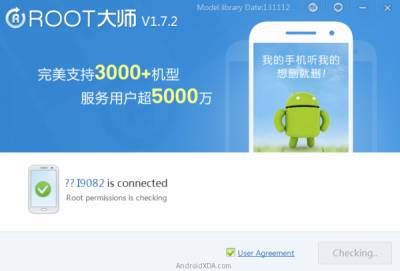
Step 6: Now, Click on the “
Root” button to begin the rooting process
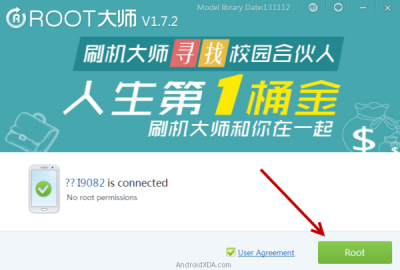
Step 7: Now, vRoot will automatically “
Reboot” your Smartphone and install the
SuperSU Application.
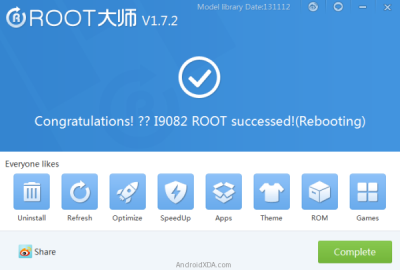
Step 8: Now your Android Device is Rooted. To check whether your phone is rooted correctly, open Applications Menu, there you will be able to see a new app installed, called
SuperSU. If this app exist then it means you have successfully rooted your device.
 Optional:
 You can also verify that your device is successfully rooted or not by
Root Checker Application.
Points to remember:-
No data loss process: Your Android Phone Data like contacts, pictures, videos, music and etc will be not affected with this method.
Warranty Void: Your Android Device Warranty may be Void after following the above tutorial.
Credits: vRoot Application was created by Shenzhen (Developer).And thanx's for tut apk archive.
If you have tried the above tool to root your Android device the please let us know if it works or not with your Device Model number.
 UC Browser, Faster Download! Click Here!
airtel 3g trick 2015, android, aircel trick vodafone free net tricks bsnl 3g tricks fileice survey bypass tricks reliance trick free recharge tricks idea UDP trick paytm mobikwik coupons discounts freecharge free recharge android apps, Free recharge tricks, premium accounts , pd proxy, finchvpn trick, 50rs 100rs cashback , check your own number operators , networks tricks, Unlimited Free Recharge Trick (2015) , Paytm Pay 5 Get 10 Cashback [Latest], IDEA 3G UDP Trick, TCP Tricks , Airtel 3G UDP Trick AirTel 3G Free Internet Vpn Trick Vodafone 3G Vpn Free Premium Internet Trick, Missing Tricks - The Tech Zone , Free Recharge Free Gprs Aircel Airtel Bsnl Idea Reliance Vodafone Hot Deals Amazon Ebay Paytm Android Tricks WhatsApp Tricks Facebook Tricks , sms tricks , calling tricks , facebook hacking tricks Watch IPL 2014 Live Streaming Online Free,Watch IPL 2015 Match Live on Mobile ,Indian Premier League 2015 (IPL 8) Live Cricket Stream Online Free,High Quality IPL Streaming, IPL 2015 Live Streaming Season 8 on Set Max TV Channel. Watch Live IPL Streaming Free broadcast Video,Full IPL 2015 Matches Free Online Watch IPL 2015 Live Streaming Online Free,Watch IPL 2015 Match Live on Mobile ,Indian Premier League 2015 (IPL 8) Live Cricket Stream Online Free,High Quality IPL Streaming, IPL 2015 Live Streaming Season 8 on Set Max TV Channel. Watch Live IPL Streaming Free broadcast Video,Full IPL 2015 Matches Free Online